Old screenshots, duplicate photos, forgotten downloads. DeckSweep finds them on your Mac and deals them to your iPhone as a deck: swipe right to keep, left to trash. Files go to the Trash — never anywhere else.


Four steps. The Mac does the finding, the phone does the deciding, the Trash does the rest.
A menu-bar helper looks through Desktop, Downloads, Pictures, Documents and Movies — you choose the folders — and ranks what it finds.
Scan the QR code in that menu with the iPhone app. Phone and Mac talk directly over your Wi‑Fi, encrypted. No account, no cloud.
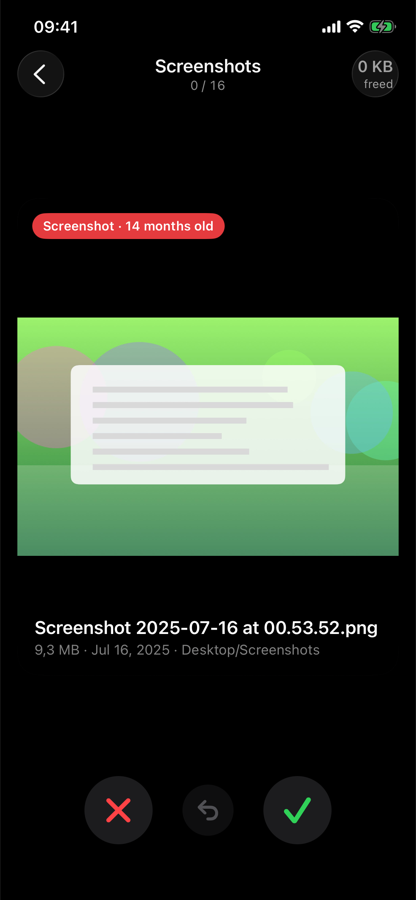
Right keeps, left trashes, down decides later. Tap for a full-size preview. Duplicate groups show every copy side by side.
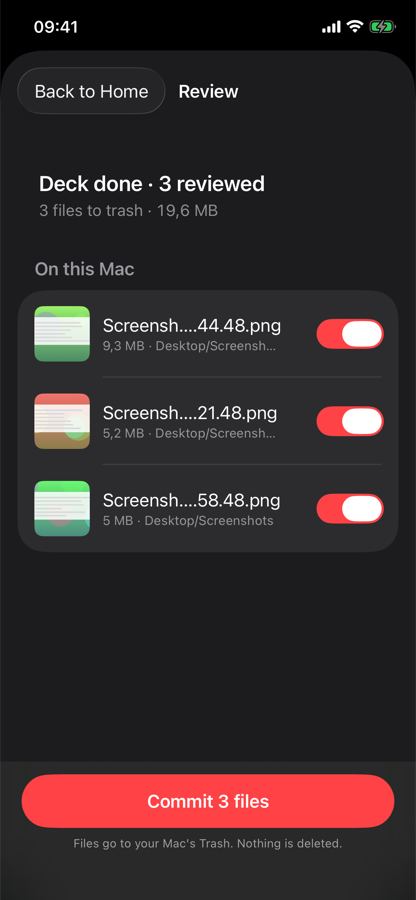
A list shows exactly what will move, with a toggle to change your mind. Then the files go to the Trash. Undo works even after.

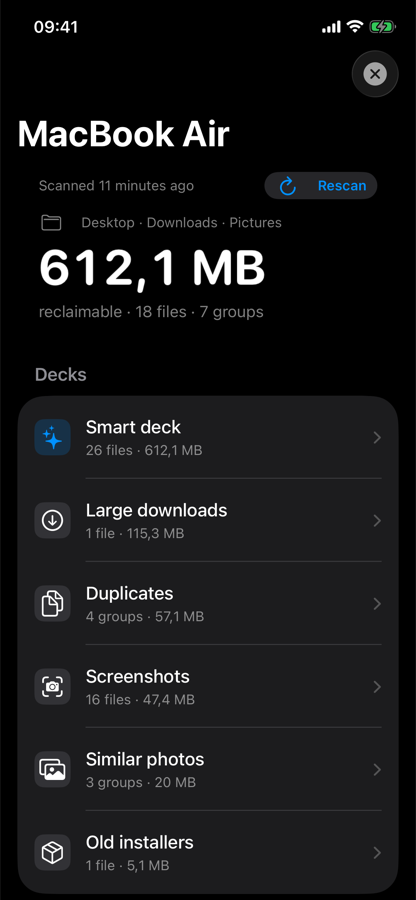
One number for the whole Mac, then decks by kind: screenshots, duplicates, similar photos, large downloads, old installers. Each shows how many files and how much space, and how far you've got.

Every card says why it's there — "Screenshot · 14 months old" — with the file name, size and folder. Swipe with your thumb or use the buttons; shake to undo.

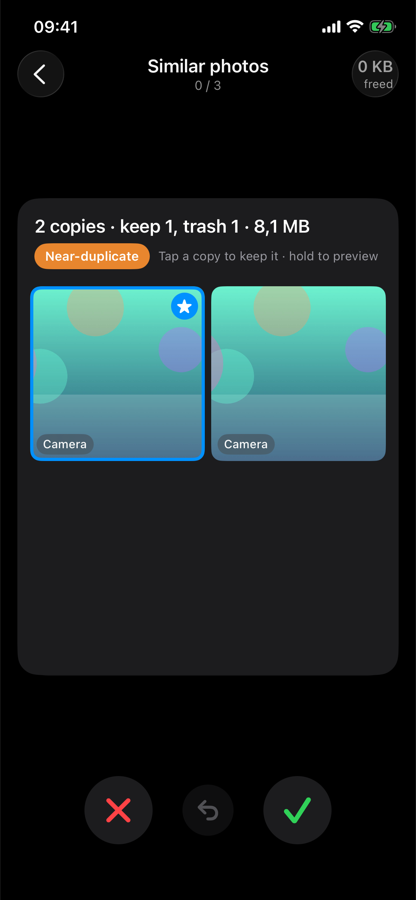
Exact copies and near-identical bursts come as one card with every copy visible. The one that stays is marked; tap another to keep that one instead.

Before anything happens you get the full list with a switch per file. Commit sends them to your Mac's Trash and tells you exactly what moved — and what it left alone.
Deleting other people's files is a responsibility. These are the rules the Mac helper enforces, not suggestions.
Never system files, never other apps' data, never your Photos library, never anything you didn't point it at.
Every file goes to the Trash. Emptying it is a separate step you confirm on the Mac, only within minutes of a commit.
The phone gets small previews; the Mac gets verdicts. No account, no analytics, no third-party code in either app. Privacy policy.
Anything modified after the scan is skipped and reported, so a file you just edited can't be swept by an old verdict.
Two apps, two minutes.
The Mac helper is free. The iPhone app is free to try, then one payment.
DeckSweep Unlimited — no limit on files, every Mac you pair, Family Sharing. No subscription.
Your first 50 files are free. Bought inside the app through your Apple ID.
Short answers; more on the support page.
Both on the same Wi‑Fi, ✦ in the Mac's menu bar, and Local Network allowed for DeckSweep in iOS Settings.
The Trash on your Mac. Finder → Trash, or Show Trash in the menu. Nothing is deleted until you empty the Trash yourself.
Shake the phone for the last swipe; use the review list before committing; after committing, the Mac's menu puts files back as long as they're still in the Trash.
No. Photo libraries, apps and other packages are never entered.
macOS 14 Sonoma or later, Apple silicon or Intel. iPhone with iOS 17 or later.